

The Knot wedding checklist is a free, personalised planning tool that generates a 12-month timeline the moment you enter your wedding date, alongside a downloadable spreadsheet and mobile app. Sign in to build your customised task list, or grab the printable checklist and timeline if you prefer working from paper at vendor meetings. Most couples end up needing both.
TL;DR:
- Most couples should prioritize booking their venue, photographer, and officiant within the first few months to secure availability and set the wedding foundation.
- Keeping online checklists and spreadsheets synchronized manually prevents task slip-ups, as they do not update automatically across formats.
- Shorter wedding engagements require rapid decision-making on venues, vendors, and guest management, with early confirmation of key arrangements.
- Cross-referencing vendor payment deadlines and contractual obligations in real time minimizes last-minute miscommunications and budget overruns.
- Using a split system of printed milestones and a live digital document helps maintain accurate, up-to-date information amidst multiple vendor interactions.
Table of Contents
- Where to find The Knot wedding checklist tools
- Your month-by-month wedding planning timeline
- Turning your checklist into a living planning system
- The fast-track checklist for 6 to 9 month engagements
- Aligning your checklist with vendor contracts and budgets
- Why luxury planners print milestones but live in a spreadsheet
- Quick links for downloading your wedding checklist tools
- Make the checklist yours, not the other way round
- Winelands Function: a done-for-you alternative to managing it yourself
- Sources
- FAQ
Where to find The Knot wedding checklist tools
Getting started takes about two minutes. Head to The Knot, create an account, and enter your wedding date. The platform then builds a personalised checklist that adjusts automatically, and you can customise it by adding, removing or reordering tasks to match your own priorities. That flexibility matters more than most first-time planners expect. Nobody’s wedding fits a generic template perfectly.
If you would rather work offline or share progress with a fiancé who is not on the app, download the wedding planning spreadsheet instead. It runs in Excel or Google Sheets and includes a budget tab, a guest list manager, a vendor contact list and a printable day-of timeline, all in one file.
Each format earns its place for a different job:
- Printable PDF checklist: ideal for vendor walkthroughs, family meetings and anywhere Wi-Fi is unreliable. Nobody wants to fumble with a phone screen while a florist waits for a decision.
- Spreadsheet template: best for couples who want full control over formulas, running budget totals and a shared file both partners can edit simultaneously.
- The Knot app: strongest for day-to-day nudges, since it sends reminders and lets you tick off tasks from your phone between meetings.
One catch worth flagging: the account-based checklist and the spreadsheet do not sync with each other automatically. If you download the spreadsheet as your working document, you will need to update your online checklist manually, or pick one as your single source of truth and treat the other as a backup reference. Trying to maintain both as live documents is how tasks slip through the gaps.
Your month-by-month wedding planning timeline
A full engagement gives you room to work in phases rather than firefighting deadlines. The Knot’s own guidance treats the 12-month timeline as a flexible template rather than a rigid script, and that advice holds regardless of how long your engagement runs. Here is how the phases break down, with the reasoning behind each stage.
Foundation phase: 12 to 9 months out
This stage sets the shape of everything that follows. Get these decisions wrong and you will be renegotiating budget and guest numbers for months.
- Set your budget first, before anything else. Every other decision, from venue capacity to catering style, flows from this number. Agree it with anyone contributing financially before you fall in love with a venue you cannot afford.
- Draft your guest list, even in rough form. Venue capacity and catering costs both depend on a headcount, so this cannot wait until “later.”
- Research and book your venue. Popular venues in peak season book out a year or more ahead, so this is usually the first major deposit you will pay.
- Book your officiant if your ceremony requires one, particularly for religious or civil ceremonies with their own booking calendars.
- Start a Pinterest board or mood board to define your aesthetic before you start meeting vendors who will ask what style you want.
- Consider a wedding planner or coordinator if your event involves multiple vendors, a destination element or a guest list over 100. This is also the point where full-service planning support pays for itself in saved hours.
Build phase: 8 to 5 months out
Momentum builds here. This is where most of your vendor deposits go out the door, so keep your budget spreadsheet open in a second tab.
- Book your photographer and videographer. These vendors get booked earliest among the “creative” category because good ones fill their calendars fast.
- Book catering, florals, music and hire. If your venue does not include an in-house caterer, this becomes one of your largest remaining line items.
- Send save-the-dates, especially if you have guests travelling from overseas or another region who need lead time for flights and leave requests.
- Order a wedding dress or suit. Bespoke tailoring and alterations often need four to six months minimum, so this is not a task to leave until the final weeks.
- Block accommodation for out-of-town guests. Reach out to nearby hotels or guesthouses for a room block before rates rise closer to the date.
- Book transport and any additional hire items, such as marquees, lighting or furniture, particularly for outdoor or destination settings.
Polish phase: 4 to 2 months out
Details sharpen here. Momentum shifts from big bookings to fine tuning what you already have in place.
- Order and send invitations, typically six to eight weeks before the wedding, with a clear RSVP deadline built in.
- Finalise your seating plan once RSVPs start rolling in, and keep a running list of dietary requirements as they arrive.
- Schedule final dress and suit fittings. Bodies change and tailoring needs adjusting, so leave this until closer to the date rather than locking it in early.
- Confirm final payments and deposits owed to each vendor, and cross-check every invoice against your original contract.
- Write vows if you are writing your own, and give yourself more time than you think you need. This task gets pushed back constantly.
- Apply for your marriage licence. Requirements and waiting periods vary significantly by country and even by municipality, so check your local registrar’s timeline well ahead of the date rather than assuming a standard window.
Final weeks and the day after
This is where a printed sheet earns its keep. Screens fail, signal drops, and a laminated page in someone’s back pocket solves more problems than a phone app ever will.
- Confirm final numbers with every vendor, including caterers, venue staff and hire companies, roughly one to two weeks before the date.
- Prepare the day-of timeline and distribute it to your wedding party, photographer, planner and key vendors so everyone works from the same schedule.
- Plan the rehearsal and rehearsal dinner. Confirm who needs to attend, assign a run-through order for the ceremony, and appoint someone (often the best man or a coordinator) to keep the rehearsal on schedule.
- Pack an emergency kit: safety pins, stain remover, blister plasters, a sewing kit, spare phone chargers and any medication anyone in the wedding party might need.
- Assemble final payments in envelopes for vendors being paid on the day, and assign a trusted person, not the couple, to handle cash and tips.
- The day after: start your thank-you list, begin any legal name change paperwork, return hired attire and formally close out final vendor invoices.
Treating each phase as a checkpoint rather than a strict deadline gives you room to adjust when life gets in the way, and life always gets in the way somewhere.
Turning your checklist into a living planning system
A checklist only works if it stays current, and that means pairing The Knot’s printable milestones with tools that update in real time. The spreadsheet template’s separate tabs for budget, guest list and vendor contacts each serve a distinct function, and treating them as one connected system rather than four disconnected lists is what keeps a wedding organised under pressure.
- Budget tab: log every deposit and balance the moment a contract is signed, not weeks later when the details get fuzzy.
- Guest list manager: update RSVP status weekly once invitations go out, so your caterer and venue always have an accurate headcount.
- Vendor contact sheet: keep every supplier’s phone number, email and contract reference in one place, so nobody is hunting for a florist’s number the morning of the wedding.
- Day-of timeline: build this last, once every vendor’s arrival and setup time is confirmed.
For deadline tracking, interactive wedding planning calendars let you export milestones as .ics files straight into Google, Apple or Outlook calendars, and dates adjust automatically once you enter your wedding date. That single step removes the manual re-dating that trips up so many DIY spreadsheets.
Decide early who “owns” the living document. If you and your partner are both editing a shared Google Sheet, agree on version control, such as always working from the same tab and dating any major changes, so nobody accidentally overwrites the other’s updates.
Pro Tip: Print your checklist and day-of timeline before every vendor meeting, but treat the digital spreadsheet as the only version either of you edits. Two “final” versions of the same document is how double-bookings happen.
The Knot app earns its keep during the final fortnight, when you need quick check-ins rather than deep edits. Tick off confirmations on your phone between calls, and save the detailed budget reconciliation for when you are sat at a laptop.
The fast-track checklist for 6 to 9 month engagements
A shorter engagement does not mean a lesser wedding. It means ruthless prioritisation. Practitioners generally recommend locking in the non-negotiables first and treating everything else as optional add-ons you fit in around them.
- Set your budget and guest list in the first week. These two numbers constrain every other decision, so resolve them before you contact a single vendor.
- Secure your venue immediately. With a compressed timeline, venue availability becomes your biggest constraint, so be prepared to compromise on a date or day of the week for a better location.
- Book your officiant and photographer in the same fortnight, since both categories tend to book out fastest even on short notice.
- Confirm catering, whether in-house or external, within the first month, as menu tastings and headcount deadlines need lead time.
- Send digital save-the-dates or invitations immediately rather than waiting for a formal paper version. Guests need travel time regardless of your own timeline.
- Simplify wherever you can: a smaller guest list, ready-to-wear attire instead of bespoke, and simpler florals or decor all buy back weeks you do not have.
Enter your date into The Knot as soon as you decide on it. The platform recalculates urgency around a compressed window, surfacing tasks that would normally sit at the nine-month mark much sooner, so you are not relying on a 12-month checklist that assumes time you do not have. A shorter engagement rewards decisiveness far more than it punishes a smaller guest list or a simpler cake.
Aligning your checklist with vendor contracts and budgets
A checklist that lives apart from your vendor contracts is only half useful. The real value comes from cross-referencing every task against a payment deadline or a contractual obligation, so nothing slips through because it was “just on the list” rather than tied to a date that costs money if missed.
- Log every deposit and balance due date into your spreadsheet and calendar the moment a contract is signed, not when you remember to.
- Set a reminder two weeks before final guest counts are due, since most caterers and venues lock in numbers at that point and charge for no-shows regardless.
- Build a follow-up process for guests who have not responded, calling or messaging directly rather than waiting indefinitely for an RSVP that never arrives.
- Reconcile every vendor’s final quote against the original estimate, flagging discrepancies before the invoice, not after.
- Assign a single day-of contact for each vendor category (catering, florals, music, photography), so questions on the day go to one person rather than looping back to the couple.
Coordinating multiple vendors on tight contractual deadlines is exactly where structured vendor management prevents the small miscommunications that snowball into wedding-day stress. If catering is one of your larger line items, cross-checking menu proposals against current festive catering trends can also help you budget realistically before final quotes land. Keeping a dedicated cost checklist alongside your vendor tracker gives you an early warning system for budget creep long before the final invoices arrive.
Why luxury planners print milestones but live in a spreadsheet
Professional planners rarely rely on a single document, and the reasoning behind that habit is worth borrowing even for a DIY wedding. A printed milestone summary works for meetings: venue walkthroughs, tasting appointments and family discussions all move faster with a page everyone can mark up together. But the moment a payment shifts, a supplier changes, or a guest count updates, that printed page is already out of date.
The working answer is a split system: the printed sheet as a meeting artefact and the living workbook as the source of truth for anything that changes week to week. For weddings involving a venue, a caterer and a stylist all working from separate contracts, this split is what prevents version confusion between suppliers who each think they have the latest number.
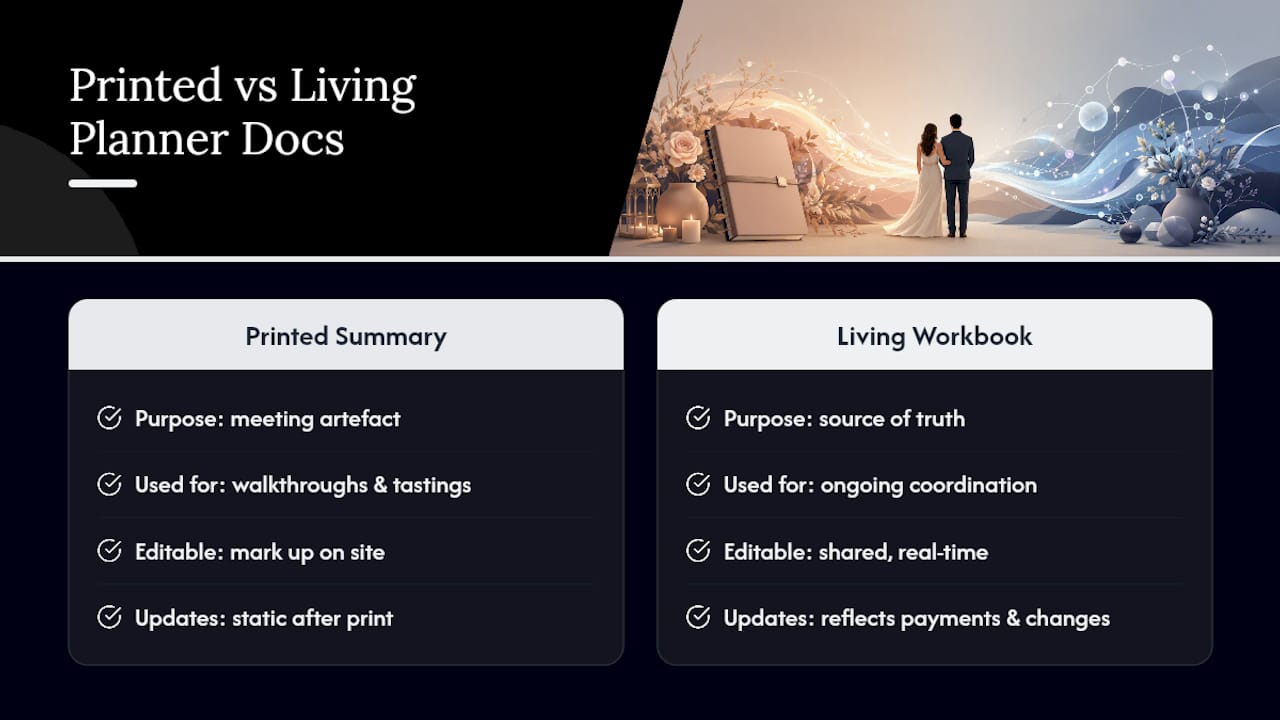
Some professional planners structure their wedding planning process for complex, multi-vendor events with printed timelines for venue walkthroughs and vendor briefings, while managing every budget line, deposit and confirmation in a shared working document that updates in real time. This discipline helps ensure smooth coordination and consistent information among all involved.
Quick links for downloading your wedding checklist tools
Start with The Knot’s own resources, then layer on the extras that keep everything synced:
- The Knot’s printable checklist and 12-month timeline
- The Knot’s Excel/Google Sheets spreadsheet template
- Interactive calendar with .ics export for milestone syncing
- A luxury-tailored spreadsheet template for couples planning a higher-budget or more complex event
- Destination wedding timeline for couples adding travel and accommodation logistics into the mix
Make the checklist yours, not the other way round
Every version of this checklist, whether it comes from an app, a spreadsheet or a printed page, is a starting draft, not an instruction manual. The couples who plan well are the ones who reorder tasks to fit their own vendors, cut what does not apply to their wedding, and trust their own judgement over a generic template. Print what you need for meetings, keep the living document as your single source of truth, and let your actual contracts, not a checklist app, dictate your real deadlines.
— Coert
Winelands Function: a done-for-you alternative to managing it yourself
Not every couple wants to own a spreadsheet, chase vendor confirmations and reconcile budgets themselves, however well-designed the tools are. Winelands Function offers full-service planning that takes the entire checklist, and the follow-through behind it, off your hands entirely.

Where a DIY workflow asks you to be your own project manager across a dozen vendors, professional event planners blend international planning standards with local expertise to coordinate from initial concept through execution. This often includes venue and supplier management, budget oversight, bespoke styling and a day-of timeline built and confirmed by experienced professionals. Whether you are planning an intimate ceremony or a large multi-vendor celebration in the Winelands, our Full Wedding Planning service is built to carry the logistics you would otherwise be tracking in a checklist. Visit our wedding planning page to see how we work, and get in touch to discuss your date.
Sources
- Printable Wedding Planning Checklist and Timeline
- The Wedding Planning Spreadsheet You Need Is Right Here
- The Knot: What is my Wedding Checklist?
- Wedding Planning Calendar (2026) | Wedding Planning Checklists
FAQ
Does The Knot have a checklist?
Yes. The Knot provides a free, personalised wedding checklist that generates automatically once you enter your wedding date, alongside a printable 12-month timeline and a downloadable spreadsheet template. You can customise the checklist by adding, removing or reordering tasks after signing in.
What is the groom’s mum responsible for?
Traditionally, the groom’s parents help with rehearsal dinner planning, contribute to the guest list on the groom’s side and often assist with accommodation arrangements for out-of-town family. Responsibilities vary enormously by family and culture, so it is worth having an early conversation rather than assuming a fixed role.
What are the most forgotten wedding tasks?
Marriage licence paperwork, thank-you notes and confirming final headcounts with vendors two weeks out are among the most commonly missed steps, largely because they fall outside the “exciting” parts of planning. Name changes and returning hired attire after the wedding also slip through frequently, since most checklists stop at the ceremony itself.
How does The Knot wedding checklist work?
You create an account, enter your wedding date, and The Knot builds a customised checklist with tasks assigned across your remaining planning window. You can also download the printable timeline or the Excel/Google Sheets spreadsheet if you prefer working offline or sharing a file directly with your partner or planner.
Is it better to use a checklist app or hire a planner?
A checklist app suits couples who enjoy managing logistics themselves and have the time to track vendor deadlines and budgets weekly. For complex weddings with multiple vendors or a tighter timeline, full-service planning through a provider like Winelands Function removes that coordination burden entirely, letting you focus on the day itself rather than the spreadsheet behind it.